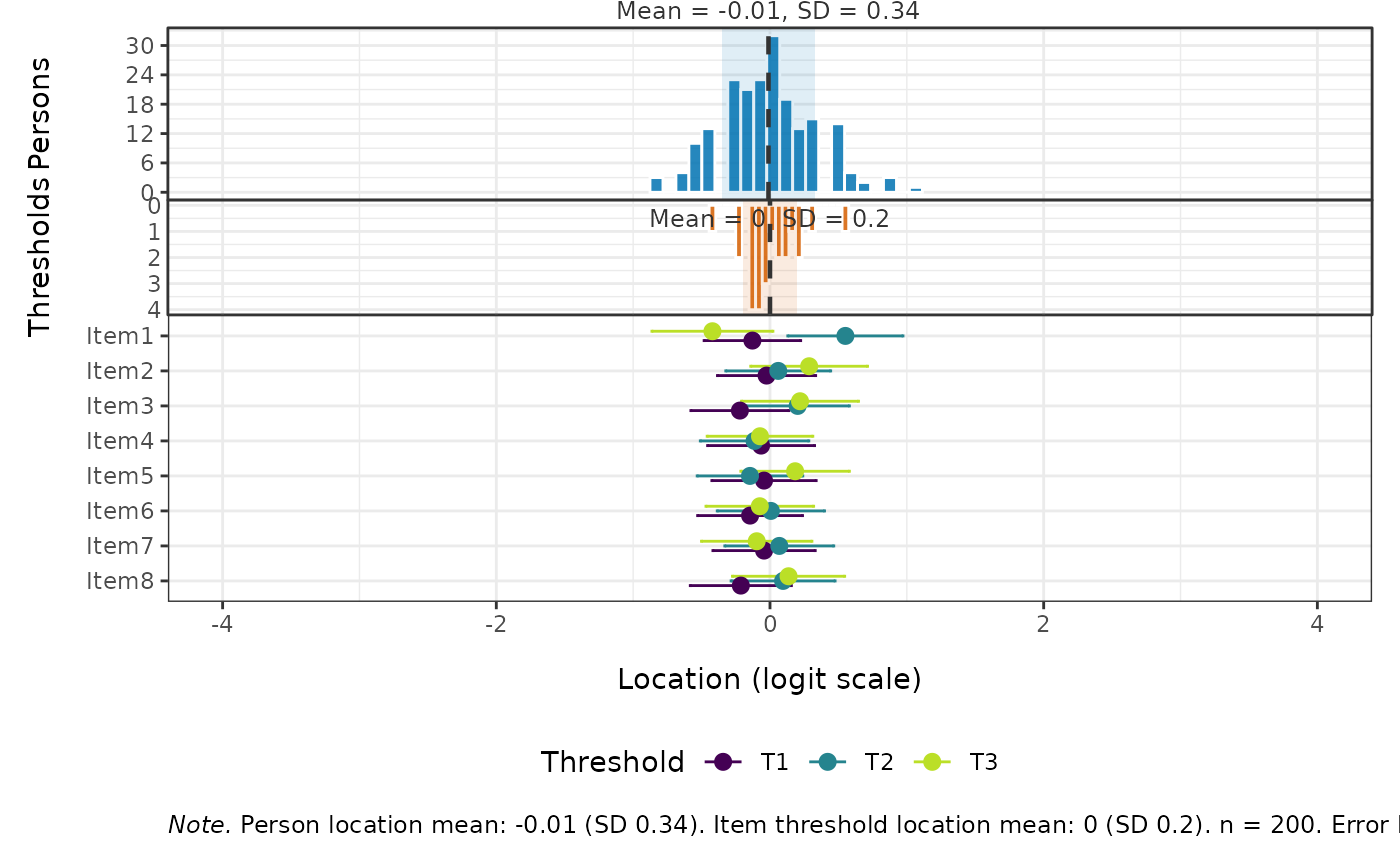
Produces a three-panel targeting plot with a shared logit scale x-axis:
Top: Histogram of person location estimates, with a reference line for the mean (or median) and shading for ±1 SD (or ±1 MAD).
Middle: Inverted histogram of item threshold locations, with the same summary annotations.
Bottom: one bar per item, either partitioned into response-category bands (
panel = "categories", the default) or drawn as a dot-and-whisker plot of the individual thresholds (panel = "thresholds").
Usage
RMtargeting(
  data,
  panel = c("categories", "thresholds"),
  robust = FALSE,
  sort_items = c("data", "location"),
  bins,
  xlim = c(-4, 4),
  ci_level = 0.95,
  category_labels = NULL,
  person_fill = "#0072B2",
  threshold_fill = "#D55E00",
  viridis_option = "G",
  viridis_begin = 0.9,
  viridis_end = 0.2,
  row_gap = NULL,
  height_ratios = c(3, 2, 5),
  output = "patchwork"
)
Arguments
- data
A data.frame or matrix of item responses. Items must be scored starting at 0 (non-negative integers). Missing values (
NA) are allowed.- panel
Character string selecting the bottom panel.
"categories"(the default) draws each item as a bar partitioned into response-category bands, with the threshold estimates and their confidence intervals below it."thresholds"draws the dot-and-whisker plot of item thresholds that was the only option before version 1.3.0.- robust
Logical. If
FALSE(the default), histogram annotations use mean ± SD. IfTRUE, median ± MAD is used instead.- sort_items
Character string controlling item ordering on the y-axis of the bottom panel.
"data"(the default) preserves the column order indata(first item at top)."location"sorts items by their average threshold location (easiest at top, hardest at bottom).- bins
Integer. Number of bins for both histograms. Default is number of unique scores divided by 2 (rounded up), but no less than 11.
- xlim
Numeric vector of length 2. Initial lower and upper limits for the shared x-axis. Automatically expanded if any person or item threshold values fall outside these limits.
- ci_level
Numeric. Confidence level for the item threshold error bars. Default is
0.95(95% CI). Set toNULLto hide error bars.- category_labels
Optional character vector of labels for the response categories, in ascending order and one per category. Used for the legend of the
"categories"panel. DefaultNULLuses the category scores.- person_fill
Fill colour for the person histogram. Default
"#0072B2"(blue).- threshold_fill
Fill colour for the item threshold histogram, and for the dot-and-whisker panel. Default
"#D55E00"(vermillion).- viridis_option
Character. Viridis palette option for the category bands. Default
"G"(mako).- viridis_begin, viridis_end
Numeric in \([0, 1]\). Start and end points of the viridis palette for the category bands. Defaults
0.9and0.2, which runs the palette from light to dark so that higher categories are darker.- row_gap
Numeric. Vertical spacing between item rows in the
"categories"panel. DefaultNULLuses1, widened to1.18when at least one category collapses, so that its label has room above the bar.- height_ratios
Numeric vector of length 3 specifying the relative heights of the top (person), middle (threshold), and bottom (dot-whisker) panels. Default
c(3, 2, 5).- output
Character string.
"patchwork"(the default) returns the combined patchwork plot."list"returns a named list of the three ggplot objects (p1,p2,p3) for further customisation.
Value
If
output = "patchwork": apatchworkobject (combinedggplot).If
output = "list": a named list with elementsp1(person histogram),p2(threshold histogram), andp3(the bottom panel selected bypanel).
Details
Together, the top and middle panels form a back-to-back histogram that makes it easy to assess whether the test is well-targeted to the sample. The bottom panel places the items on the same scale, so the category bands show which response is the most likely one at the locations where the persons actually sit.
Estimation method selection.
The function checks whether any item response category has fewer than 3
observations. If all categories have at least 3 responses, item threshold
locations and their standard errors are estimated via Conditional Maximum
Likelihood (CML) using psychotools::pcmodel() (a dichotomous item is a
2-category PCM). If any category has fewer than 3 responses, the function
falls back to Marginal Maximum Likelihood (MML) estimation via
mirt::mirt() with itemtype = "Rasch" and SE = TRUE, which is more
numerically stable under sparse-category conditions. A message is emitted
when the MML fallback is used.
In both cases, item threshold locations are centered (shifted so the grand mean of all thresholds equals zero).
Person estimates are obtained by Warm's weighted likelihood (WLE) from the fitted item thresholds, consistent with the rest of the package. WLE is finite at extreme scores, so all-zero and perfect responders are located rather than dropped.
Confidence intervals for item thresholds are based on Wald-type
intervals: threshold estimate ± z × SE, where z is the standard normal
quantile corresponding to ci_level.
Category bands. With panel = "categories", each band spans the
locations at which its response category is the most likely response. When
an item's thresholds are ordered these boundaries are the Andrich
thresholds themselves. When they are not, the disordered run is pooled by
averaging and the categories it skips over, which are never the most likely
response at any location, collapse to a red tick labelled with the category
number. Red arrows below the bar give the size of each threshold reversal in
logits. Ordered thresholds therefore leave no red marks at all.
The two outer bands are open-ended and fade towards the panel edge, since the lowest and highest categories have no outer boundary.
The ggplot2 and patchwork packages must be installed (they are in
Suggests, not Imports).
Examples
# \donttest{
if (requireNamespace("ggplot2", quietly = TRUE) &&
requireNamespace("patchwork", quietly = TRUE)) {
# Polytomous example
set.seed(42)
sim_data <- as.data.frame(
matrix(sample(0:3, 200 * 8, replace = TRUE), nrow = 200, ncol = 8)
)
colnames(sim_data) <- paste0("Item", 1:8)
# Default: category bands, mean/SD, data order, 95% CI
RMtargeting(sim_data)
# Category bands with labels
RMtargeting(sim_data, category_labels = c("Never", "Sometimes",
"Often", "Always"))
# The dot-and-whisker panel
RMtargeting(sim_data, panel = "thresholds")
# Robust (median/MAD), sorted by location, 84% CI
RMtargeting(sim_data, robust = TRUE, sort_items = "location",
ci_level = 0.84)
# Get list of sub-plots for customisation
plots <- RMtargeting(sim_data, output = "list")
plots$p1 + ggplot2::ggtitle("My custom title")
# Dichotomous example
sim_bin <- as.data.frame(
matrix(sample(0:1, 200 * 10, replace = TRUE), nrow = 200, ncol = 10)
)
colnames(sim_bin) <- paste0("Item", 1:10)
RMtargeting(sim_bin)
}
 # }
# }