Overview
This vignette walks through the steps of a Rasch analysis using data from the nine-item Patient Health Questionnaire (PHQ-9; Kroenke et al. (2001)). The example follows the four psychometric criteria proposed by Christensen et al. (2021) for the validation of patient-reported outcome measures (PROMs):
- Unidimensionality — the items measure a single latent construct.
- Local independence — after conditioning on the latent trait, item responses are independent of each other.
- Ordered response category thresholds (monotonicity) — moving up the latent trait increases the probability of higher categories.
- Invariance / no DIF — item parameters are the same across relevant external groups (e.g. gender).
We then move on to complementary descriptors that are commonly reported alongside the four criteria above:
- Targeting — how well person and item locations overlap on the latent continuum.
- Reliability — how precisely the scale separates respondents, overall and at each point on the scale.
- Person fit — unexpected response patterns.
- Item and person parameters — estimates for reuse in scoring.
For a more extensive treatment of Rasch analysis in R, see https://pgmj.github.io/raschrvignette/RaschRvign.html. For a Bayesian sibling package, see https://pgmj.github.io/easyRaschBayes/.
NOTE: all simulation-based functions use a low number of iterations to make this vignette render faster. You should use more iterations for actual analysis work. 400 is the calibrated floor for the multiplicity-corrected p-values and is the package default, while 1000 to 2000 is advisable for a final analysis, since decisions about items near the decision boundary can change with the seed: at 400 iterations, two analyses with different seeds disagree about at least one item roughly 10 percent of the time (Johansson 2026). An earlier recommendation, that fewer iterations could improve detection for conditional infit at small samples, is withdrawn: that advantage came from an expected range that had not converged, and it was paid for with an inflated family-wise error rate. A false discovery rate correction (
correction = "fdr_bh"or"fdr_by") needs far more iterations than the default family-wise one, because a bootstrap p-value can be no smaller than 1/(B+1).
To get faster simulations, please make use of
options(mc.cores = 4), where 4 should be
replaced with the number of high performance CPU cores your computer has
available. This setting is automatically applied by all functions that
can use parallel processing.
Data
The bundled phq9 dataset is a 600-respondent random
subsample of the PHQ-9 module from the U.S. National Health and
Nutrition Examination Survey (NHANES, September 2024 release) with
complete responses on all nine items. NHANES microdata are released to
the public domain by the U.S. federal government.
library(easyRasch2)
data(phq9)
items <- phq9[, 1:9]   # 9 item columns, scored 0..3

# add item information
item_desc <- c(
  "Little interest or pleasure in doing things",
  "Feeling down, depressed, or hopeless",
  "Trouble falling or staying asleep, or sleeping too much",
  "Feeling tired or having little energy",
  "Poor appetite or overeating",
  "Feeling bad about yourself - or that you are a failure or have let yourself or your family down",
  "Trouble concentrating on things, such as reading the newspaper or watching television",
  "Moving or speaking so slowly that other people could have noticed",
  "Thoughts that you would be better off dead or of hurting yourself in some way"
)

item_resp <- c("Not at all","Several days","More than \nhalf the days","Nearly every day")
str(items)
#> 'data.frame':    600 obs. of  9 variables:
#>  $ q1: int  3 0 1 2 3 3 1 3 2 1 ...
#>  $ q2: int  3 0 2 3 3 3 1 3 2 0 ...
#>  $ q3: int  3 1 3 0 3 1 0 3 2 0 ...
#>  $ q4: int  3 1 3 2 3 3 1 3 2 0 ...
#>  $ q5: int  3 0 3 2 3 2 0 1 2 0 ...
#>  $ q6: int  3 2 3 2 3 2 2 3 3 0 ...
#>  $ q7: int  3 3 3 2 3 2 2 3 3 0 ...
#>  $ q8: int  1 0 2 0 3 3 0 0 1 0 ...
#>  $ q9: int  3 0 0 2 3 1 2 0 0 0 ...
summary(rowSums(items))
#>    Min. 1st Qu.  Median    Mean 3rd Qu.    Max.
#>    0.00   10.00   16.00   15.41   21.00   27.00
table(phq9$gender, useNA = "ifany")
#>
#> Female   Male   <NA>
#>    426    143     31
summary(phq9$age)
#>    Min. 1st Qu.  Median    Mean 3rd Qu.    Max.
#>   15.00   26.00   33.00   36.06   44.00   85.00
Descriptive plots
Before fitting any model it is worth eyeballing the response distributions:
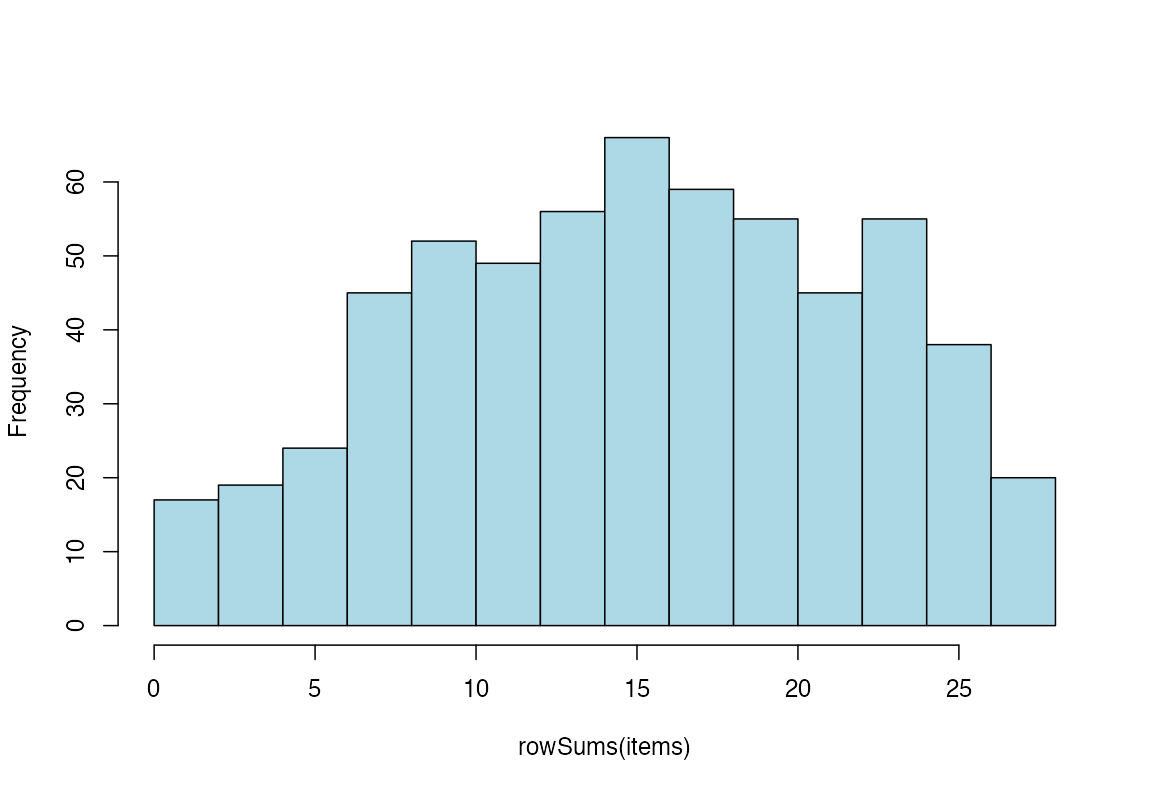
Figure 1. Histogram of ordinal sum scores
RMplotBar(items, ncol = 2)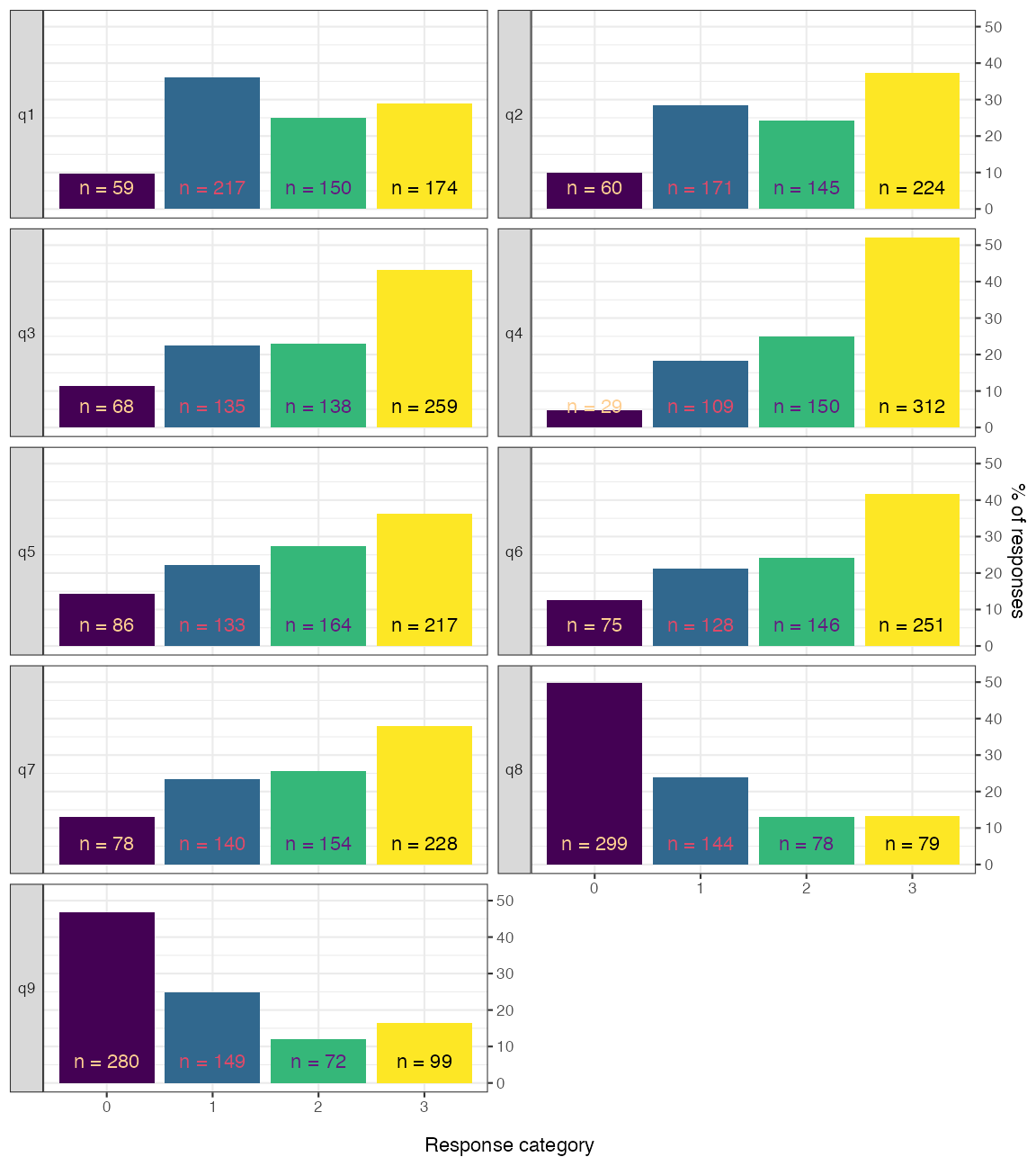
Figure 2. Faceted bar chart of response distributions
RMplotStackedbar(items, show_percent = TRUE)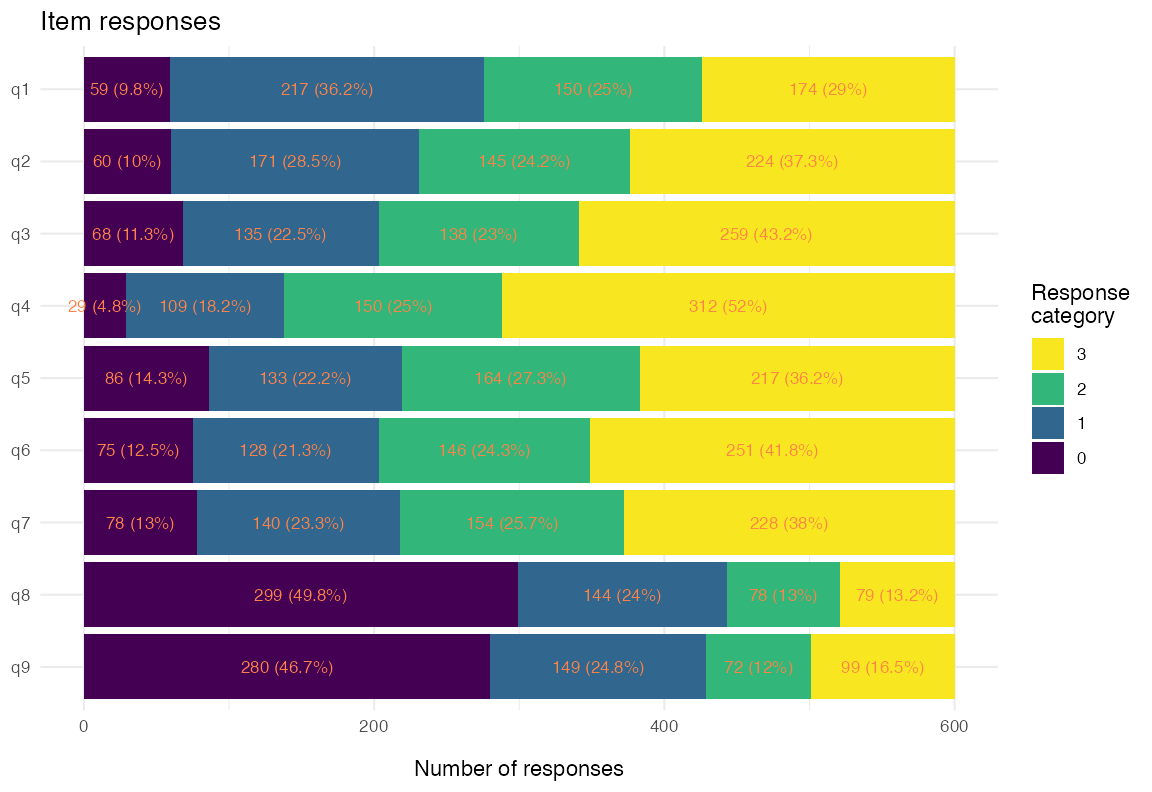
Figure 3. Stacked-bar response distribution
1. Unidimensionality
easyRasch2 provides several complementary
unidimensionality diagnostics that can be combined for a robust
conclusion:
- item-level conditional infit MSQ statistics (Müller 2020)
- item-level item-restscore associations with Goodman-Kruskal’s \gamma (gamma) (Kreiner 2011)
- confirmatory factor analysis (CFA) with WLSMV estimator for ordinal data
- principal components analysis (PCA) of the standardized residuals (Chou and Wang 2010)
- Martin-Löf test with Monte-Carlo p-values (Christensen and Kreiner 2007)
Conditional infit MSQ
It is important to note that the RMitemInfit() function
uses conditional infit, which is both robust to
different sample sizes and makes ZSTD unnecessary (Müller
2020). Müller also questions the usefulness of outfit, and my
simulation studies (Johansson 2025, 2026) reached the
same conclusion. Thus, outfit is not reported.
Conditional item infit mean-square statistics flag items whose
response patterns deviate from the Rasch expectation. With
RMitemInfitCutoff(), per-item highest-density intervals
serve as the reference instead of rule-of-thumb cutoffs (Johansson
2025). Passing the RMitemInfitCutoff() object to
RMitemInfit() flags items on a multiplicity-corrected bootstrap
p-value, with family-wise error rate (FWER; the default) or
false discovery rate (FDR) correction, and the interval is reported
alongside as a description of where a fitting item’s statistic is
expected to fall (Johansson
2026).
NOTE:
RMitemInfit(),RMitemRestscore(),RMlocdepQ3(),RMlocdepGamma()andRMdifGamma()use the corrected p-value whenever the full cutoff object is supplied.RMdimCFA()andRMdimResidualPCA()takep_value = TRUEas an opt-in, andRMitemInfitMI()has no p-value path, so it always flags against the interval.
infit_cut <- RMitemInfitCutoff(items, iterations = 100, parallel = FALSE,
                           seed = 3)
RMitemInfit(items, cutoff = infit_cut)| Item | Infit MSQ | Infit low | Infit high | p | p (adj) | Flagged | Relative location |
|---|---|---|---|---|---|---|---|
| q1 | 0.946 | 0.911 | 1.097 | 0.2871 | 0.4554 | -0.56 | |
| q2 | 0.778 | 0.924 | 1.107 | 0.0099 | 0.0099 | overfit | -0.76 |
| q3 | 1.234 | 0.897 | 1.107 | 0.0099 | 0.0198 | underfit | -0.83 |
| q4 | 0.835 | 0.893 | 1.098 | 0.0198 | 0.0396 | overfit | -1.48 |
| q5 | 1.069 | 0.917 | 1.102 | 0.1881 | 0.4356 | -0.58 | |
| q6 | 0.895 | 0.926 | 1.097 | 0.0297 | 0.1386 | -0.76 | |
| q7 | 0.986 | 0.919 | 1.101 | 0.7624 | 0.7624 | -0.66 | |
| q8 | 1.260 | 0.880 | 1.119 | 0.0099 | 0.0099 | underfit | 0.97 |
| q9 | 1.315 | 0.842 | 1.107 | 0.0099 | 0.0099 | underfit | 0.79 |
You can also get a plot summarizing simulated and observed item
infit, using RMitemInfitPlot(). Since conditional infit
needs complete data, sibling functions that combine multiple imputation
with conditional infit are useful when you have partial missingness:
RMitemInfitMI() and RMitemInfitCutoffMI().
Based on the table, items 3, 8, and 9 underfit the Rasch model, while items 2 and 4 are overfit. Item 2 is “Feeling down, depressed, or hopeless”, which is a very general item in terms of measuring depression, so this is expected.
A low item fit value, often referred to as an item being “overfit” to the Rasch model, indicates that responses may be too predictable. This is often the case for items that are very general/broad in scope in relation to the latent variable. You will often find overfitting items to also have local dependence (residual correlations) issues with other items. Overfit may be likened to having a much stronger factor loading than other items in a confirmatory factor analysis or a higher level of discrimination in an Item Response Theory model with two or more parameters.
A high item fit value, often referred to as being “underfit” to the Rasch model, can indicate several things. Often underfit is due to multidimensionality or a question that is difficult to interpret and thus has noisy response data. The latter could for instance be caused by a question that asks about two things at the same time, or is ambiguous for other reasons.
Item-restscore
Item-restscore uses Goodman-Kruskal’s \gamma (gamma) and shows the expected and observed correlation between an item and a score based on the rest of the items (Kreiner 2011). Similarly, but inverted, to item infit, a lower observed correlation value than expected indicates underfit, that the item may not belong to the dimension. A higher than expected observed value indicates an overfitting and possibly redundant item. Overfitting items will often also show issues with local dependency.
Without a cutoff, RMitemRestscore() uses an asymptotic
p-value that is miscalibrated under the Rasch model: it flags
too many items as overfit in small samples and too few as underfit at
any sample size, which is in line with the asymptotic test detecting
underfit less often than infit in an earlier simulation study (Johansson
2025). As for infit, passing the full
RMitemRestscoreCutoff() object instead flags items on a
multiplicity-corrected bootstrap p-value, and in simulation
this test was more sensitive than infit to overfit and about equally
sensitive to underfit.
rs_cut <- RMitemRestscoreCutoff(items, iterations = 100, parallel = FALSE,
                                seed = 8)
RMitemRestscore(items, cutoff = rs_cut)| Item | Observed | Expected | Difference | Diff low | Diff high | p | p (adj) | Flagged | Rel. location |
|---|---|---|---|---|---|---|---|---|---|
| q1 | 0.66 | 0.62 | 0.041 | -0.032 | 0.036 | 0.0396 | 0.1089 | -0.56 | |
| q2 | 0.72 | 0.62 | 0.102 | -0.036 | 0.043 | 0.0099 | 0.0099 | overfit | -0.76 |
| q3 | 0.57 | 0.63 | -0.059 | -0.032 | 0.036 | 0.0099 | 0.0198 | underfit | -0.83 |
| q4 | 0.71 | 0.62 | 0.097 | -0.052 | 0.043 | 0.0099 | 0.0099 | overfit | -1.48 |
| q5 | 0.62 | 0.62 | -0.001 | -0.035 | 0.040 | 0.7921 | 0.7921 | -0.58 | |
| q6 | 0.69 | 0.63 | 0.065 | -0.035 | 0.037 | 0.0099 | 0.0099 | overfit | -0.76 |
| q7 | 0.64 | 0.62 | 0.020 | -0.041 | 0.035 | 0.3069 | 0.4851 | -0.66 | |
| q8 | 0.55 | 0.63 | -0.083 | -0.044 | 0.041 | 0.0099 | 0.0099 | underfit | 0.97 |
| q9 | 0.59 | 0.64 | -0.046 | -0.039 | 0.039 | 0.0198 | 0.0594 | 0.79 |
RMitemRestscorePlot() shows the simulated and observed
differences in a plot.
Item-restscore found items 2, 4 and 6 to be overfit and items 3 and 8
to be underfit. It agrees with infit on items 2, 3, 4 and 8, adds item 6
as overfit, and leaves item 9, which infit found underfitting, just
short of the threshold. The asymptotic test,
RMitemRestscore(items) without a cutoff, misses the
underfit of item 3. The two methods are best used together.
CFA-based cutoffs for CFI / RMSEA and item loadings
RMdimCFACutoff() simulates data from a unidimensional
PCM and fits a unidimensional ordinal CFA to each simulated dataset,
building a parametric-bootstrap reference distribution for the model fit
indices (SRMR, CFI, RMSEA) and for the per-item standardized
factor loadings. It returns this simulation object;
RMdimCFA() then fits the CFA to the observed data and
tabulates the observed fit indices and loadings against the simulated
reference. Observed values beyond the simulated cutoffs are implausible
under a unidimensional data-generating process.
cfa_cut <- RMdimCFACutoff(items, iterations = 100, parallel = FALSE,
                       seed = 2)
cfa_tbl <- RMdimCFA(items, cutoff = cfa_cut)
cfa_tbl$fit| Index | Observed | Cutoff | Direction | Flagged |
|---|---|---|---|---|
| CFI | 0.9623 | 0.9957 | < 1st pct | TRUE |
| RMSEA | 0.1217 | 0.0351 | > 99th pct | TRUE |
| SRMR | 0.0572 | 0.0257 | > 99th pct | TRUE |
cfa_tbl$loadings| Item | Observed | Expected low | Expected high | Flagged |
|---|---|---|---|---|
| q1 | 0.790 | 0.682 | 0.786 | above |
| q2 | 0.876 | 0.689 | 0.809 | above |
| q3 | 0.693 | 0.707 | 0.814 | below |
| q4 | 0.823 | 0.664 | 0.824 | |
| q5 | 0.737 | 0.699 | 0.812 | |
| q6 | 0.797 | 0.702 | 0.821 | |
| q7 | 0.753 | 0.704 | 0.805 | |
| q8 | 0.670 | 0.692 | 0.816 | below |
| q9 | 0.718 | 0.709 | 0.816 |
RMdimCFAPlot(cfa_cut, data = items) returns a list of
two figures: $loadings (observed loadings against their
simulated expected ranges) and $fit (the simulated
fit-index distributions with the observed values overlaid).
The table above agrees mostly with earlier findings. The overall model fit is clearly worse than expected under unidimensionality and item 2 is overfit (higher standardized factor loading than expected), with items 3 and 8 underfit (lower loadings). Additionally, the CFA flags item 1 as overfit. We should however take the simulation-based results with a grain of salt since we are using too few iterations to get reliable results.
Residual PCA
After fitting the Rasch model, the residuals should contain no further systematic structure. The largest eigenvalue of the residual correlation matrix can be considered the headline diagnostic; a value clearly above the simulation-based cutoff suggests a secondary dimension. However, an eigenvalue below the cutoff does not by itself support unidimensionality.
pca_cut <- RMdimResidualPCACutoff(items, iterations = 100, parallel = FALSE,
                       seed = 1)
RMdimResidualPCA(items, cutoff = pca_cut)| Component | Eigenvalue | Proportion of variance | Flagged |
|---|---|---|---|
| PC1 | 1.520 | 0.200 | TRUE |
| PC2 | 1.341 | 0.176 | TRUE |
| PC3 | 1.113 | 0.146 | FALSE |
| PC4 | 0.909 | 0.119 | FALSE |
| PC5 | 0.853 | 0.112 | FALSE |
Also of interest is the plot of item standardized loadings on the first residual contrast and item locations. This figure can be helpful to identify clusters in data, perhaps related to local dependency and/or multidimensionality.
RMdimResidualPCA(items, output = "ggplot")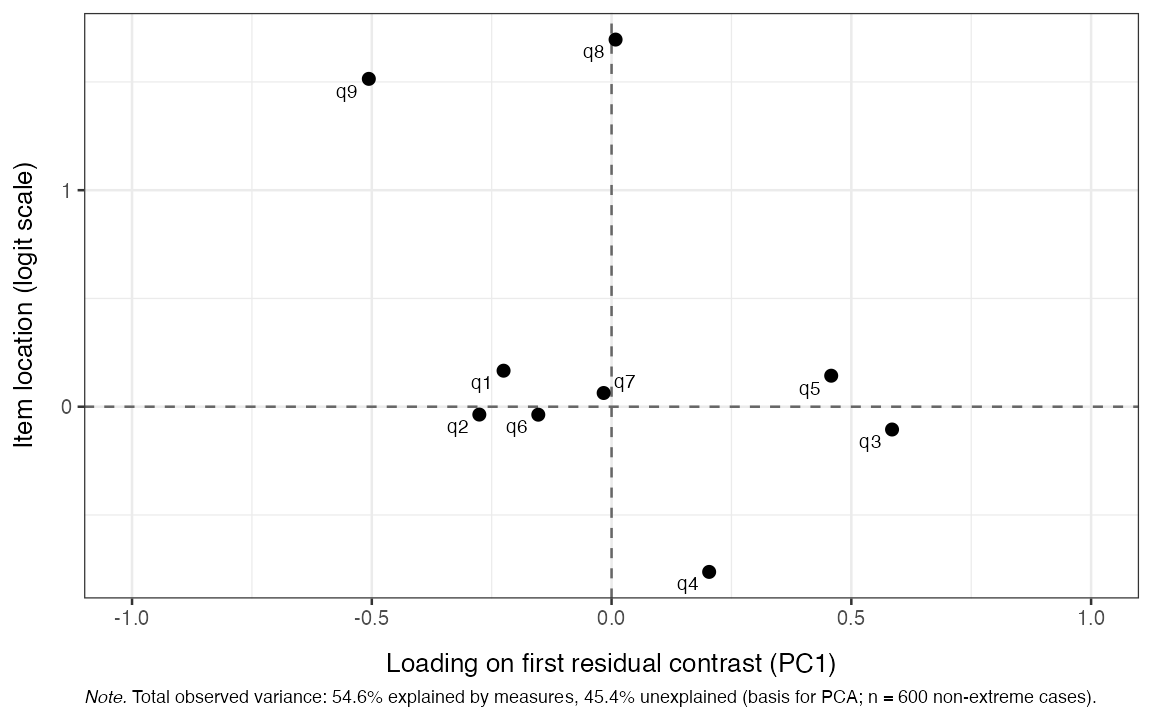
Figure 4. Standardized loadings on the first residual contrast
Martin-Löf test
This is a likelihood-ratio test of unidimensionality against an a priori specified multidimensional alternative. The p-value is obtained by parametric-bootstrap (Monte Carlo) sampling under the unidimensional null. A significant p-value constitutes strong evidence that items do not all measure one common latent variable. However, while a non-significant p-value indicates that data are consistent with one common latent variable across the partition, it is not to be considered proof of unidimensionality on its own.
In the use case demonstrated below, we have hypothesized that the
five psychosomatic symptoms are a separate subscale from the other
items. Looking at the PCA plot above, we can see tendencies of this
clustering based on the loadings on the first residual contrast factor,
with items 3-5 most clearly deviating from 1, 2, 6, and 9. Using the PCA
plot to determine item partitioning for the M-L test is not recommended;
see ?RMdimMartinLof for details and references.
mlof <- RMdimMartinLof(items, iterations = 100,
                       partition = list(
                         c("q1","q2","q6","q9"),
                         c("q3","q4","q5","q7","q8")
                       ),
                       seed = 4
)

mlof$p_value
#> [1] 0.00990099
mlof$wle_correlation
#>   subscale_a subscale_b         r ci_lower  ci_upper      p_value   n
#> 1          1          2 0.7174163 0.676203 0.7541533 5.994126e-96 600
The p-value rejects unidimensionality across the partition,
while the subscale WLE correlation indicates the dimensions are strongly
related. Note that the Monte Carlo p-value’s resolution is
limited by the number of iterations: the attainable values are k/(B+1), so with B
= 100 iterations the smallest possible p-value is 1/101 \approx 0.0099 (returned as
mlof$p_value_floor). A p-value equal to
that floor means that no simulated statistic reached the observed one
and should be read as p < 0.01 — the
true p-value may be much smaller. Use more iterations
(e.g. 1000, floor \approx 0.001) when
reporting results. The M-L test results can be further investigated
using the diagnostic function
RMdimMartinLofResiduals().
2. Local independence
Local independence (LD) can be assessed with multiple methods. Yen’s
Q_3 statistic (Yen 1984)
is the correlation between person-item standardized residuals for every
item pair. There are two ways to evaluate LD with Q_3, both generated with a run of
RMlocdepQ3Cutoff(). One is to determine a global
simulation-based cutoff, where Q_3
values in the residual correlation matrix above the cutoff flag LD (Christensen et al.
2017).
q3_cut <- RMlocdepQ3Cutoff(items, iterations = 100, parallel = FALSE,
                           seed = 4)
q3_results <- RMlocdepQ3(items, cutoff = q3_cut)
q3_results$matrix| q1 | q2 | q3 | q4 | q5 | q6 | q7 | q8 | q9 | above_cutoff | |
|---|---|---|---|---|---|---|---|---|---|---|
| q1 | ||||||||||
| q2 | 0.23 | * | ||||||||
| q3 | -0.19 | -0.19 | ||||||||
| q4 | 0 | -0.03 | 0.08 | * | ||||||
| q5 | -0.2 | -0.25 | 0.09 | 0 | * | |||||
| q6 | -0.18 | 0.02 | -0.15 | -0.14 | -0.12 | |||||
| q7 | -0.13 | -0.18 | -0.2 | -0.08 | -0.13 | -0.05 | ||||
| q8 | -0.17 | -0.3 | -0.18 | -0.16 | -0.1 | -0.18 | 0.08 | * | ||
| q9 | -0.12 | 0.06 | -0.23 | -0.31 | -0.24 | 0.02 | -0.19 | -0.11 | * |
For a more powerful Q_3 test, supply
the same cutoffs object to RMlocdepQ3(). Each item pair is
then judged against its own simulated null distribution and flagged on a
multiplicity-corrected bootstrap p-value, which controls the
family-wise error rate across all pairs (Johansson 2026).
This is the default whenever the full cutoffs object is provided. The
per-pair expected range is reported alongside as a reference, and it can
be helpful to plot it against the observed value. We’ll limit the output
to the 6 item-pairs that deviate the most.
q3_plots <- RMlocdepQ3Plot(simfit = q3_cut, data = items, n_pairs = 6)
q3_plots$pairs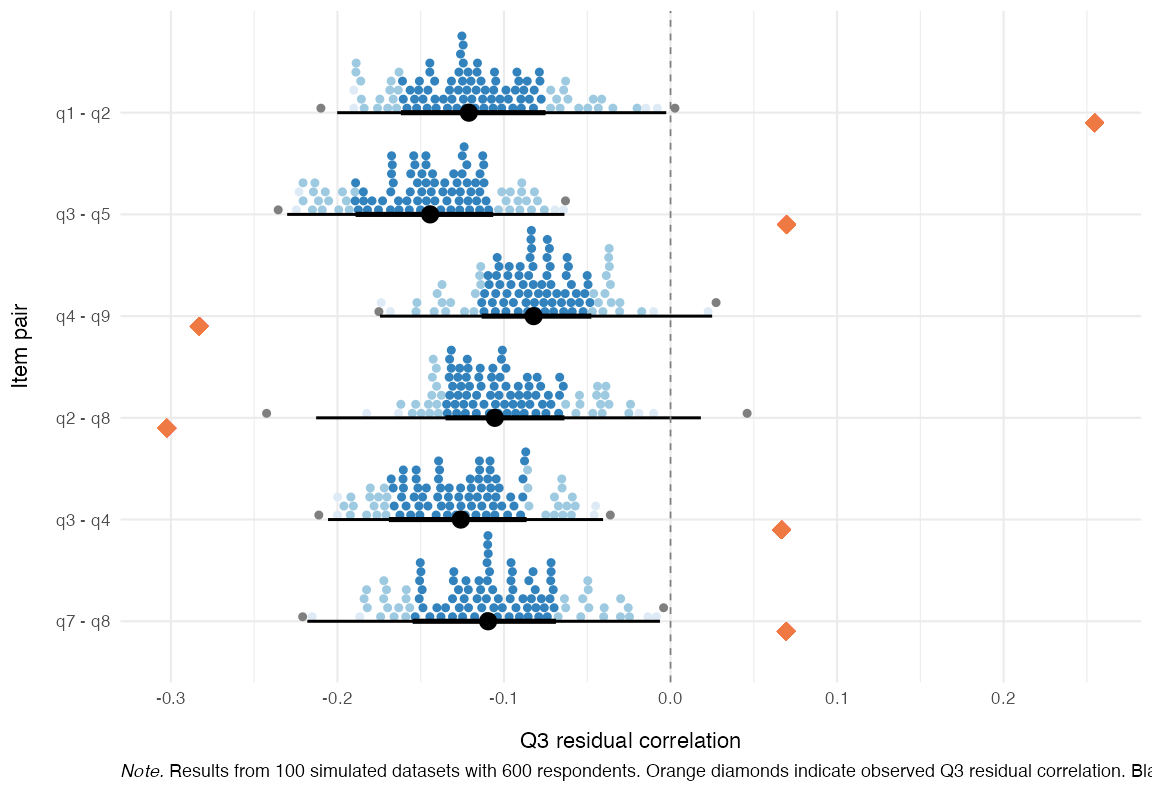
Figure 5. Observed and expected Q_3 residuals
Here we can see that the overfit item 2 does indeed have the strongest LD issues, primarily with item 1, but also with item 9. For analysis of multidimensionality, it can also be interesting to see which items have lower than expected residual correlations.
Partial gamma LD
A second perspective on LD is the partial gamma coefficient (Kreiner and Christensen 2004; Kreiner 2007) between observed item pairs, conditional on the rest-score. Note that this function evaluates both directions of LD, thus the output is two tables. We’ll restrict the output to the 6 item-pairs with largest LD deviations.
RMlocdepGamma(items, n_pairs = 6)| Item 1 | Item 2 | Partial gamma | Adj. p-value (BH) | p-value sign. | Gamma pair (max) |
|---|---|---|---|---|---|
| q1 | q2 | 0.531 | 0.000 | *** | 0.577 |
| q4 | q9 | -0.381 | 0.000 | *** | -0.381 |
| q2 | q9 | 0.332 | 0.000 | *** | 0.332 |
| q2 | q8 | -0.323 | 0.000 | *** | -0.323 |
| q7 | q8 | 0.303 | 0.000 | *** | 0.303 |
| q6 | q9 | 0.287 | 0.001 | *** | 0.287 |
| Item 1 | Item 2 | Partial gamma | Adj. p-value (BH) | p-value sign. | Gamma pair (max) |
|---|---|---|---|---|---|
| q2 | q1 | 0.577 | 0.000 | *** | 0.577 |
| q9 | q4 | -0.453 | 0.000 | *** | -0.381 |
| q8 | q2 | -0.415 | 0.000 | *** | -0.323 |
| q4 | q3 | 0.361 | 0.000 | *** | 0.361 |
| q5 | q3 | 0.303 | 0.000 | *** | 0.303 |
| q9 | q2 | 0.291 | 0.001 | *** | 0.332 |
You can also get simulation-based thresholds for partial gamma LD,
using RMlocdepGammaCutoff(), which can be used with
RMlocdepGamma() and also to plot the results with
RMlocdepGammaPlot(). Supplying the cutoff object switches
the table from the asymptotic p-values shown above to
multiplicity-corrected bootstrap ones, and adds a
gamma_pair column: each pair is tested once, on the larger
of its two rest-score directions, so both tables carry the same result
for a pair.
Item pairs flagged by both Q_3 and partial gamma are the strongest candidates for further inspection or possible item revision. Some argue for creating testlets by combining a locally dependent pair into a single polytomous super-item rather than eliminating one in an LD pair. I suggest looking closely at the item content before taking any action. Often, one will see very similarly worded items, where one item in an LD pair is clearly redundant. Another solution to LD can be the Graphical Loglinear Rasch Model by Kreiner and Christensen (Kreiner 2007), but that is beyond the scope of this vignette.
3. Ordered response category thresholds
For a polytomous item to function as intended, the thresholds separating adjacent response categories should be ordered: the threshold from “Not at all” to “Several days” should sit below the one from “Several days” to “More than half the days”, and so on.
A classical method to assess item response functions is to plot probability of response curves for each item and response category.
RMitemCatProb(items, category_labels = item_resp)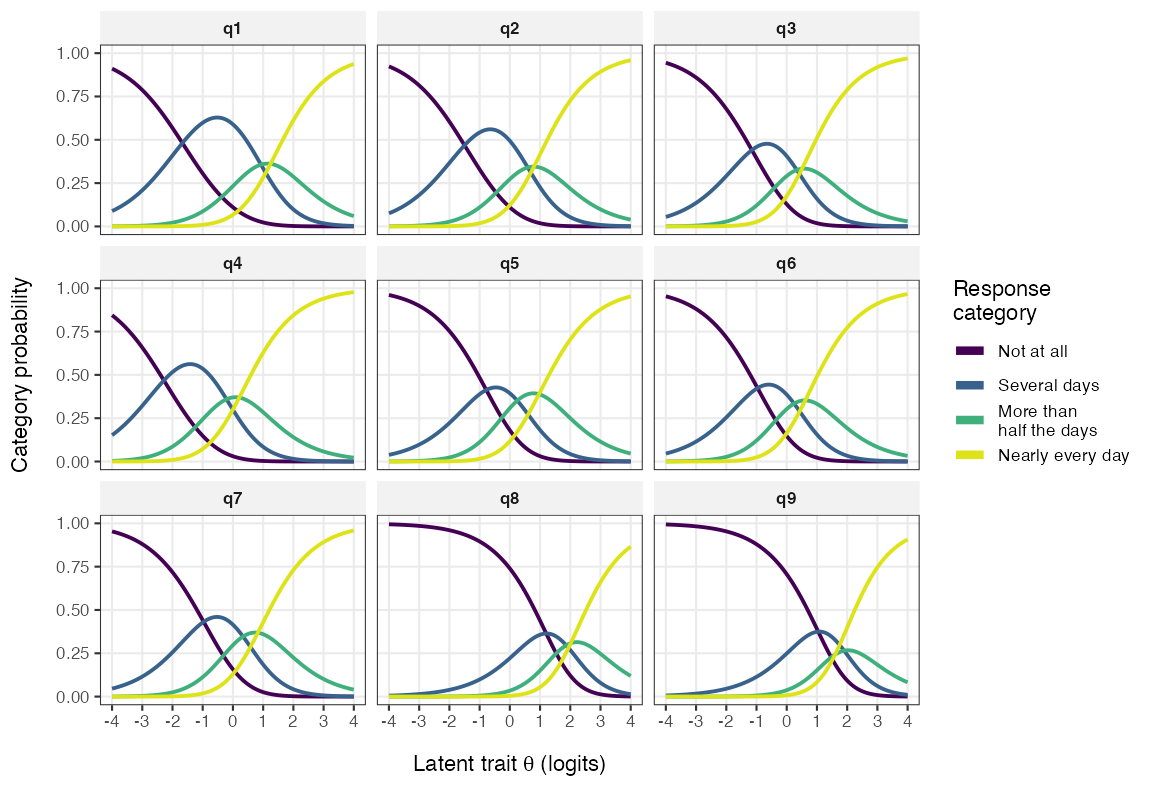
Figure 6. Item Probability Function curves
In the plot above, each category curve should be the most likely response at some part of the latent continuum (x axis). Item category thresholds are the points where two adjacent category lines cross each other (where they are both equally probable). In the plot above, we can see that the second highest category does not work well compared to other categories. It is disordered for item 9 and, as is perhaps clearer in the plot below, shows very small distances from the adjacent categories in most items (see T2 and T3 below, which are the lower and upper thresholds for “More than half the days”).
RMitemHierarchy() plots each item’s threshold locations
on the latent scale, ordered by overall item difficulty. Disordered
thresholds appear as overlapping or reversed segments and are a clear
signal that the response categories are not being used in the intended
order.
RMitemHierarchy(items, item_labels = item_desc)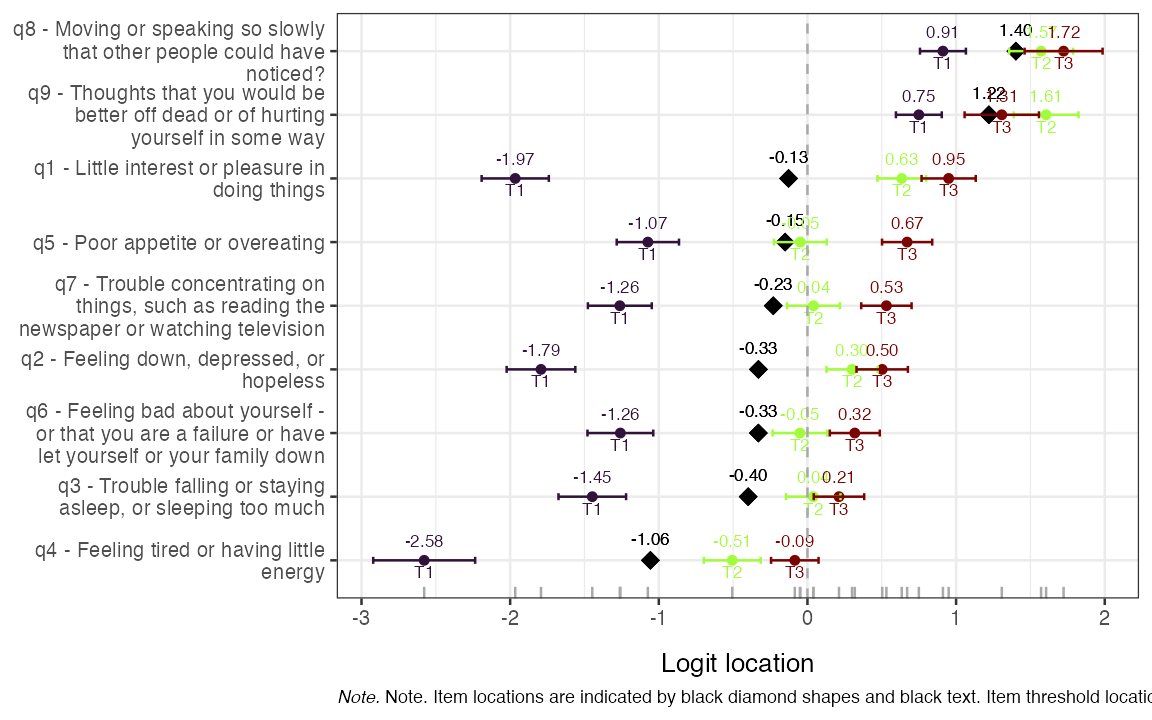
Figure 7. Item-hierarchy
The same disordering is visible in the bottom panel of the targeting plot further down, which marks never-modal categories and threshold reversals in red.
4. Invariance / no DIF
We use three complementary DIF assessments. The Andersen likelihood-ratio test (LRT, Andersen 1973) partitions the sample by an external variable, refits the model in each subgroup, and compares item locations. The partial gamma approach (Kreiner 2007; Christensen et al. 2021) looks for an association between item responses and the external variable conditional on the rest-score, and the Rasch tree (below) searches for DIF across covariates without pre-specified groups. All are run on the gender variable, which has some missing values that are automatically dropped by the functions (noted in a console message and/or table/figure caption output).
First, it is important to review the response distribution when dividing the sample. If there are zero or low (below 8 or so) responses in a category, there may be issues with estimating the model parameters.
RMplotTile(items, category_labels = item_resp, group = phq9$gender)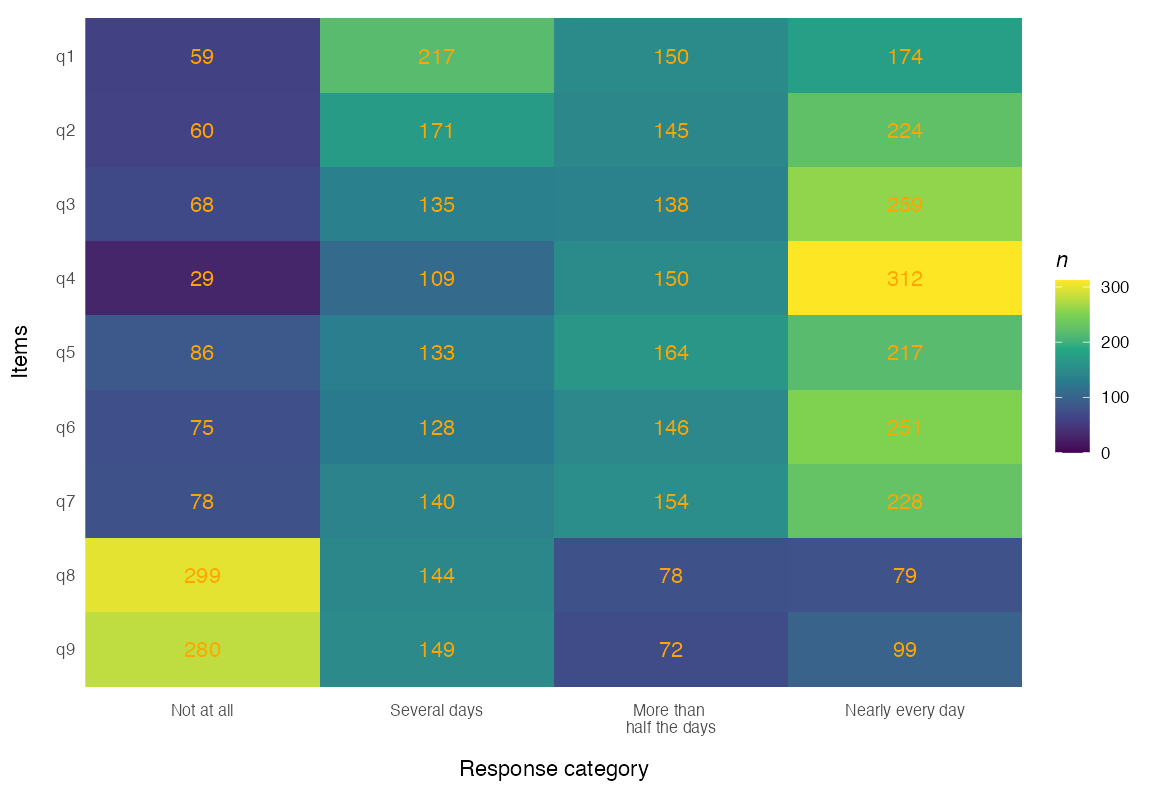
Figure 8. DIF grouped response distribution tile plot
Andersen LR-test
RMdifLR(items, dif_var = phq9$gender, level = "threshold", output = "ggplot")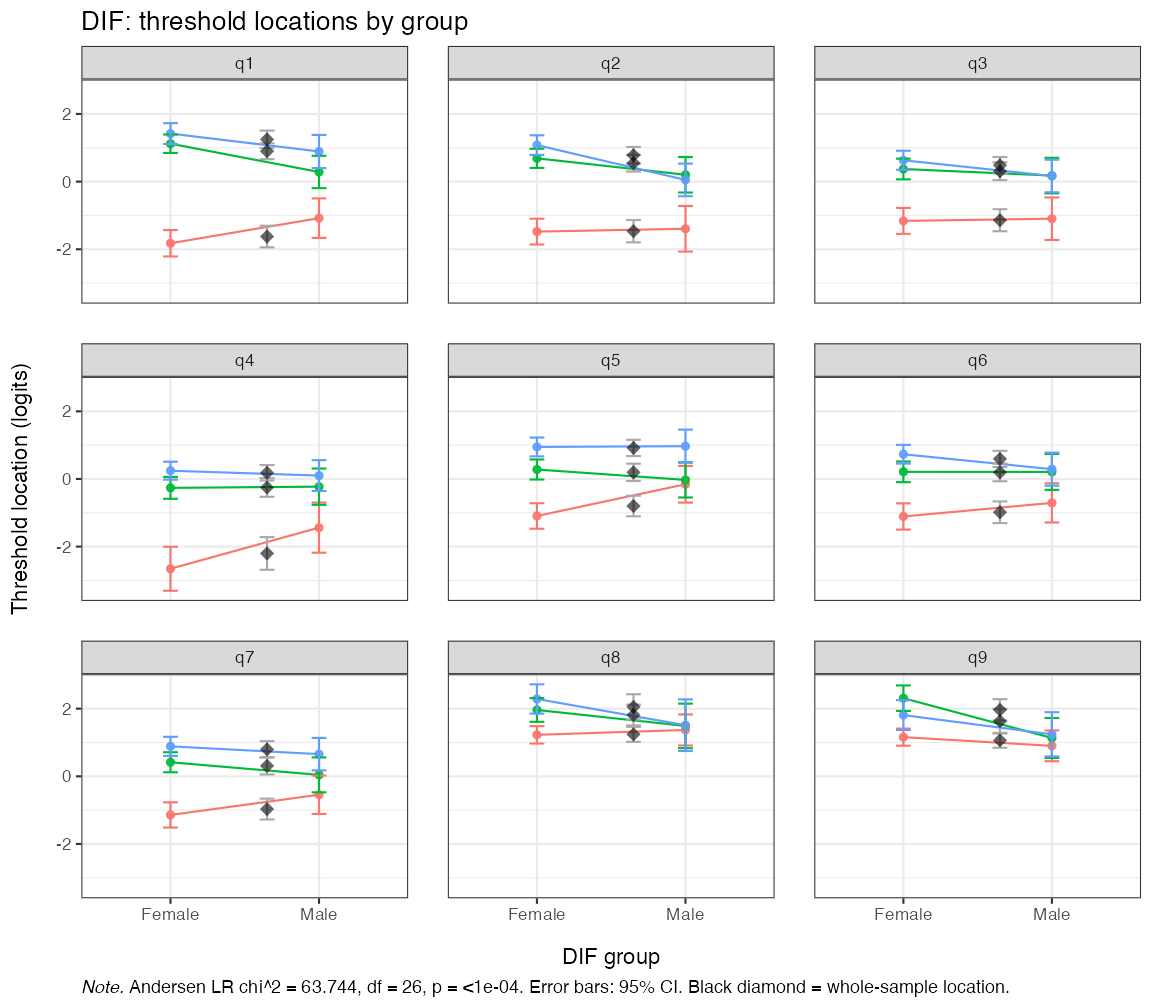
Figure 9. Andersen LR-test DIF locations by gender
The plot shows the item threshold locations estimated in each gender group with the corresponding confidence band. The global LR test is also reported in the plot caption, with a statistically significant test indicating problems with DIF between groups. However, this test is sensitive to sample size and number of items and should, like all global tests, be interpreted with care.
Partial-gamma DIF
This plot annotates each item with its partial-\gamma DIF coefficient and shows group differences within class intervals (respondents grouped by their total/latent score).
RMitemICCPlot(items, dif_var = phq9$gender, error_band = TRUE)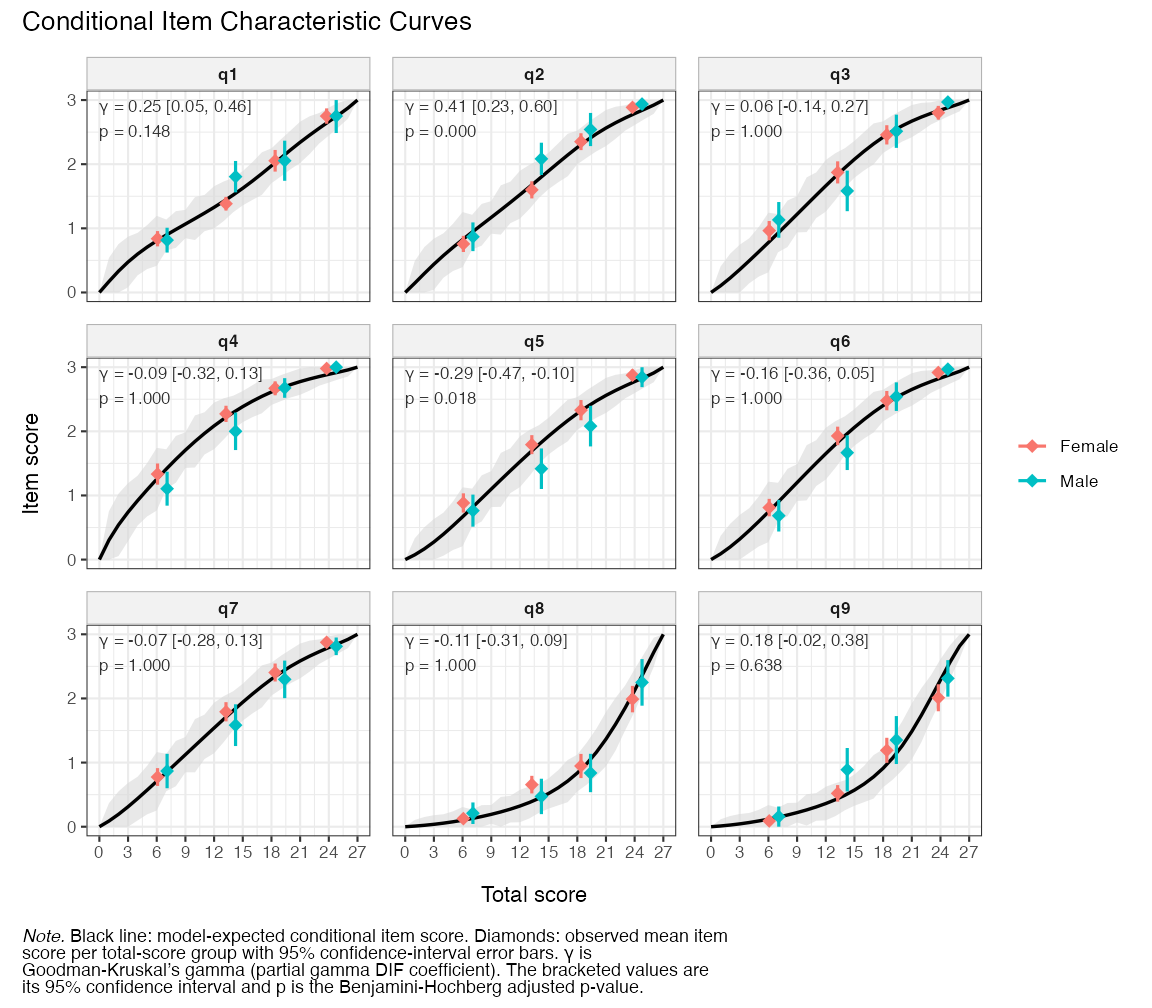
Figure 10. Partial Gamma DIF Conditional Item Characteristic Curves
To demonstrate the FWER-adjusted p-values, we’ll run the partial-\gamma DIF analysis with parametric bootstrap (only 100 here for rendering speed, which limits the reliability of the p-values).
difpg <- RMdifGammaCutoff(items, dif_var = phq9$gender, iterations = 100,
                          parallel = FALSE, seed = 5)
RMdifGamma(items, cutoff = difpg, dif_var = phq9$gender, p_value = TRUE)| Item | Partial gamma | SE | Lower CI | Upper CI | Gamma low | Gamma high | p | p (adj) | Flagged |
|---|---|---|---|---|---|---|---|---|---|
| q1 | 0.251 | 0.104 | 0.046 | 0.456 | -0.126 | 0.173 | 0.0099 | 0.0396 | TRUE |
| q2 | 0.411 | 0.094 | 0.227 | 0.595 | -0.175 | 0.165 | 0.0099 | 0.0099 | TRUE |
| q3 | 0.064 | 0.103 | -0.138 | 0.266 | -0.167 | 0.187 | 0.5446 | 0.8713 | FALSE |
| q4 | -0.092 | 0.114 | -0.315 | 0.131 | -0.185 | 0.217 | 0.4059 | 0.8713 | FALSE |
| q5 | -0.286 | 0.092 | -0.467 | -0.104 | -0.148 | 0.171 | 0.0198 | 0.0297 | TRUE |
| q6 | -0.155 | 0.105 | -0.361 | 0.050 | -0.164 | 0.167 | 0.0891 | 0.3564 | FALSE |
| q7 | -0.075 | 0.102 | -0.275 | 0.126 | -0.164 | 0.164 | 0.4554 | 0.8713 | FALSE |
| q8 | -0.112 | 0.102 | -0.311 | 0.088 | -0.198 | 0.171 | 0.2772 | 0.6634 | FALSE |
| q9 | 0.180 | 0.100 | -0.015 | 0.376 | -0.237 | 0.181 | 0.0990 | 0.3960 | FALSE |
Rasch tree (model-based recursive partitioning)
The DIF methods above compare groups that we specify in advance. The Rasch tree approach (Strobl et al. 2015) instead searches for DIF: the model is fitted to the full sample, covariates are tested for parameter instability, and whenever instability is detected the sample is split at the covariate value that maximizes it. The procedure then repeats within each subgroup, so several useful things come for free. Continuous covariates such as age need no arbitrary pre-categorization — the optimal cutpoint is estimated from the data. Interactions are handled naturally, since later splits are conditional on earlier ones (e.g. a gender split appearing only among older respondents). And if no instability is found, the tree simply does not split.
Statistically significant splits are not necessarily important
splits, particularly in large samples. RMdifTree()
therefore pairs the tree with an effect-size classification for every
item at every split (Henninger et al. 2025):
the Mantel-Haenszel odds ratio on the Delta scale developed at the
Educational Testing Service (ETS) for dichotomous data, or the partial
gamma coefficient for polytomous data, classified into the ETS
categories A (negligible), B (slight to moderate), and C (moderate to
large) (Holland and Thayer 1986; Zwick 2012). For partial gamma
the B/C boundaries are the familiar 0.21 / 0.31 used by
RMdifGamma(), so the two functions read on the same scale.
Note that these boundaries are conventions carried over from large-scale
educational testing, not values calibrated to your sample and items — in
contrast to the simulation-based cutoffs used elsewhere in this package
— so the A/B/C labels are best read as a rough magnitude guide rather
than a calibrated test.
RMdifTree(items, covariates = phq9$gender)Node 1 – gender: Female vs Male (n left = 426, n right = 143)
| Item | EffectSize | SE | Class | Flagged |
|---|---|---|---|---|
| q1 | 0.251 | 0.104 | B | yes |
| q2 | 0.411 | 0.094 | C | yes |
| q3 | 0.064 | 0.103 | A | no |
| q4 | -0.092 | 0.114 | A | no |
| q5 | -0.286 | 0.092 | B | yes |
| q6 | -0.155 | 0.105 | A | no |
| q7 | -0.075 | 0.102 | A | no |
| q8 | -0.112 | 0.102 | A | no |
| q9 | 0.180 | 0.100 | A | no |
The tree splits on gender, and the effect sizes match what the
partial gamma analysis showed above: q2 is classified as C and q1 and q5
as B, while the remaining items are negligible (A). With a single binary
covariate the tree reduces to the familiar two-group comparison — its
advantages appear when you supply several covariates at once
(covariates = phq9[, c("gender", "age")]), where it tests
all of them, picks split points for continuous ones, and uncovers
interactions.
Three options are worth knowing about: purification = “iterative” recomputes effect sizes while excluding already-flagged items from the matching score; stability = TRUE refits the tree on resamples to report how often each covariate is selected and where the cutpoints land — a guard against overinterpreting a single sample’s tree structure; and output = “plot” draws the tree with per-node item parameters.
Next step
Since we found issues with item misfit, local dependence, and gender DIF, these need to be addressed before the scale is used for measurement. Notably, item 2 recurs across all three criteria — overfit, the strongest local dependence (with item 1), and the largest gender DIF — making it the natural first candidate for closer inspection. The recommended approach is iterative: remove a single item (for instance, an underfit item, or one item from an LD pair after reviewing item content), then re-run the full set of analyses, since fit indications for the remaining items change with every removal. Some of the flags above may be consequences of others: overfitting items can push fitting items into the underfit range, and underfitting items, especially from a second dimension, can make fitting items look overfit. When the sample is large enough, it is good practice to set aside a random holdout subsample before the analysis, so that the final item set can be confirmed in data that played no part in the item-reduction decisions.
The following sections are primarily of interest once an acceptable item set has been established; here we continue with all nine items for demonstration purposes.
Targeting
A targeting plot is a Wright-map style display of how well the item thresholds match the distribution of person locations on the latent scale. The top panel is a histogram of person locations and the middle one a histogram of item threshold locations. The bottom panel draws each item as a bar partitioned into its response categories, with the threshold estimates and their confidence intervals below it. Each band spans the locations at which its category is the most likely response.
RMtargeting(items)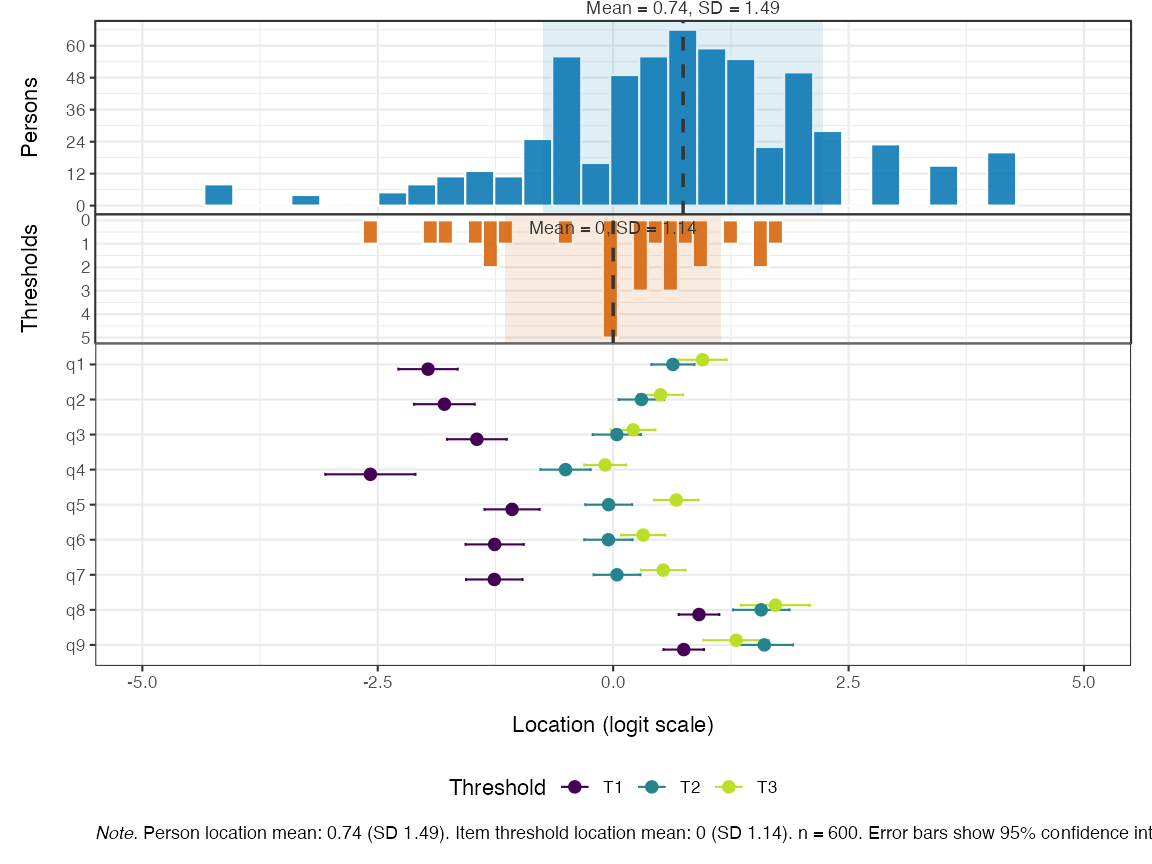
Figure 11. Person-item targeting
That bottom panel doubles as a check on criterion 3 above. A category
that is never the most likely response at any location collapses to a
red tick labelled with its category number, and red arrows below the bar
give the size of each threshold reversal in logits, so ordered
thresholds leave no red marks at all. For the dot-and-whisker display of
item thresholds used before version 1.3.0, pass
panel = "thresholds".
Reliability
Reliability is reported two ways here: as summary coefficients for the scale as a whole, and as a curve showing how precision varies along the latent continuum.
Summary coefficients
RMreliability() reports four metrics, in the order they
appear in the output. Cronbach’s alpha, the person separation index
(PSI), marginal reliability, and Relative Measurement Uncertainty (RMU),
the last derived from posterior person-location uncertainty using
plausible values. Marginal reliability is the latent-density-weighted
mean of the conditional reliability curve shown below. Alpha, PSI and
marginal can use a bootstrap for confidence intervals. All four range
from 0 to 1, with higher values indicating better separation and
precision.
RMreliability(items, draws = 200, rmu_iter = 20, parallel = FALSE,
seed = 6)| Metric | Estimate | Lower (95% HDCI) | Upper (95% HDCI) | Notes |
|---|---|---|---|---|
| Cronbach’s alpha | 0.886 | NA | NA | no bootstrap |
| PSI | 0.838 | NA | NA | no bootstrap |
| Marginal (curve mean) | 0.876 | NA | NA | no bootstrap |
| RMU (WLE) | 0.881 | 0.867 | 0.895 | 200 PVs, 20 RMU iterations |
Conditional reliability
A single coefficient implies that every respondent is measured with
the same precision, which is rarely the case. Test information is
highest where the item thresholds are concentrated and falls away
towards the extremes, so the same scale can separate respondents well in
the middle of its range and poorly at either end.
RMreliabilityCurve() shows that directly.
RMreliabilityCurve(items, statistic = "reliability", benchmark = 0.8)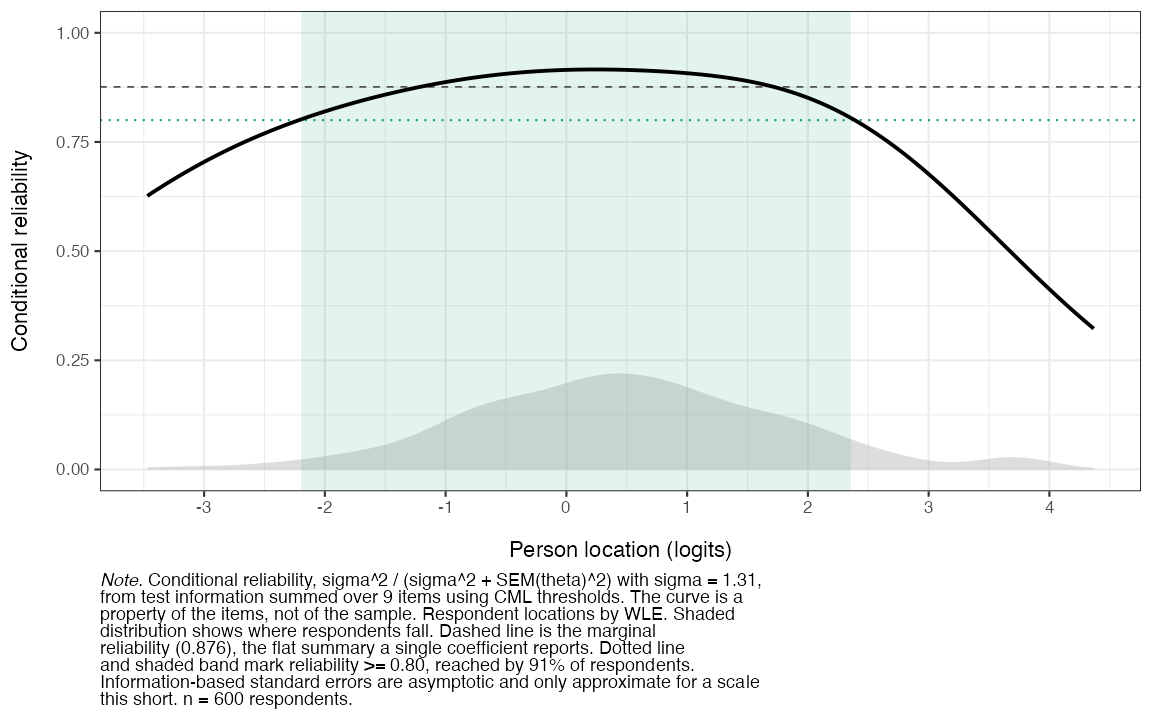
Figure 12. Conditional reliability across the latent continuum
The benchmark argument shades the region where the scale
reaches a stated level and reports the share of respondents inside it,
which is usually the practical question behind the figure. The dashed
line is the marginal reliability from the table above, and the
distribution behind the curve is the same set of person locations as the
targeting plot. The default statistic = "sem" plots the
conditional standard error in logits instead, which is the quantity to
use when reporting the precision of an individual score. Test
information is also available, using
statistic = "information".
Item and person parameters
Item (threshold) locations can be easily summarized in wide or long format, with or without SEs.
RMitemParameters(items, format = "wide")| item | t1 | t2 | t3 | location | se_t1 | se_t2 | se_t3 |
|---|---|---|---|---|---|---|---|
| q1 | -1.966 | 0.634 | 0.950 | -0.127 | 0.165 | 0.115 | 0.124 |
| q2 | -1.793 | 0.300 | 0.503 | -0.330 | 0.168 | 0.122 | 0.118 |
| q3 | -1.447 | 0.039 | 0.212 | -0.399 | 0.166 | 0.130 | 0.116 |
| q4 | -2.578 | -0.506 | -0.085 | -1.056 | 0.250 | 0.136 | 0.109 |
| q5 | -1.074 | -0.048 | 0.671 | -0.150 | 0.153 | 0.125 | 0.115 |
| q6 | -1.259 | -0.051 | 0.318 | -0.330 | 0.161 | 0.130 | 0.114 |
| q7 | -1.262 | 0.041 | 0.531 | -0.230 | 0.157 | 0.125 | 0.115 |
| q8 | 0.912 | 1.572 | 1.723 | 1.402 | 0.110 | 0.151 | 0.180 |
| q9 | 0.749 | 1.605 | 1.307 | 1.221 | 0.110 | 0.153 | 0.172 |
Person parameters are also sometimes referred to as thetas, latent
scores, or person locations. By default, Warm’s weighted likelihood
estimation (WLE) is used for minimal bias. The function exports one
value and SE for each individual, below reduced to only print the first
10 rows of the dataframe. Note that all table outputs in
easyRasch2 can be output as dataframes instead, if so
desired. The option output = "file" makes it easy to export
estimated latent scores for each respondent to a CSV file.
ppar <- RMpersonParameters(items, output = "dataframe")
head(ppar, 10)
#>         theta       sem sum_score n_answered extreme
#> 1   2.2760818 0.6184838        25          9   FALSE
#> 2  -0.9997531 0.4658741         7          9   FALSE
#> 3   1.1406643 0.4262412        20          9   FALSE
#> 4   0.3379335 0.3959994        15          9   FALSE
#> 5   3.6996335 1.3248428        27          9    TRUE
#> 6   1.1406643 0.4262412        20          9   FALSE
#> 7  -0.6129841 0.4288279         9          9   FALSE
#> 8   0.9701100 0.4155331        19          9   FALSE
#> 9   0.6465516 0.4019393        17          9   FALSE
#> 10 -3.2339486 0.9216600         1          9   FALSE
Ordinal-to-interval transformation
For converting ordinal sum-scores to interval-scaled person-location
estimates with associated standard errors, use
RMscoreSE().
RMscoreSE(items, output = "ggplot")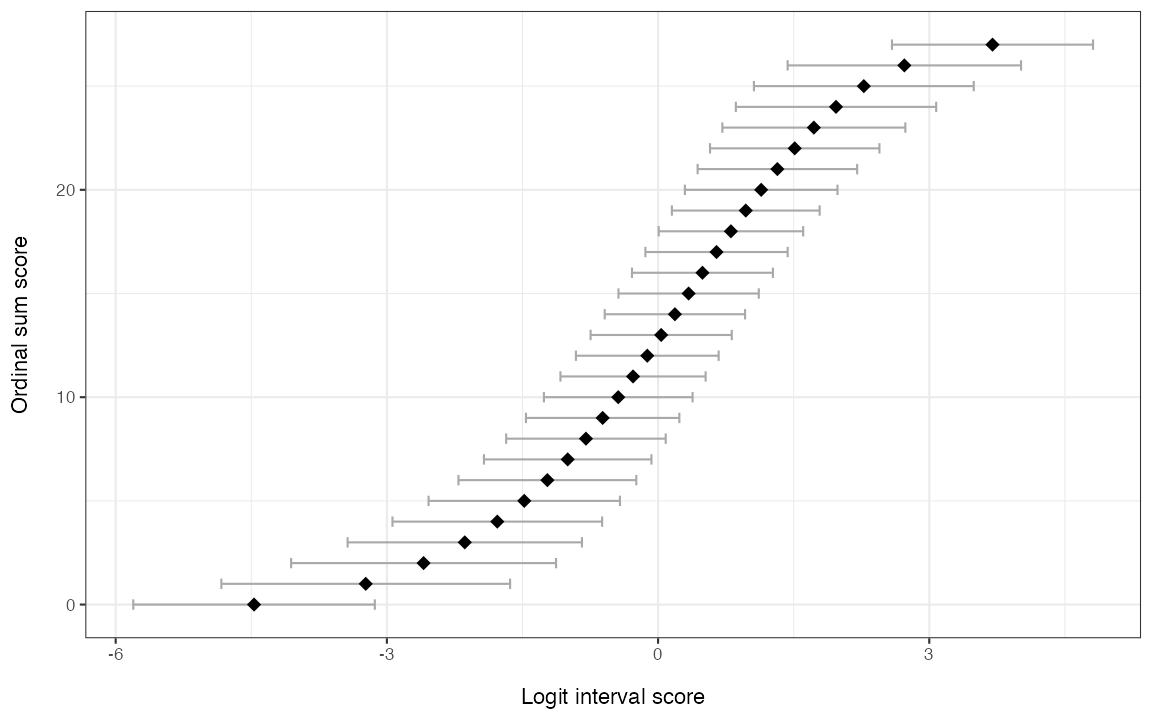
Figure 13. Sum-score to WLE conversion with 95% CIs
RMscoreSE(items)| Ordinal sum score | Logit score | Logit std.error |
|---|---|---|
| 0 | -4.469 | 1.536 |
| 1 | -3.234 | 0.922 |
| 2 | -2.594 | 0.737 |
| 3 | -2.138 | 0.638 |
| 4 | -1.779 | 0.574 |
| 5 | -1.480 | 0.528 |
| 6 | -1.224 | 0.493 |
| 7 | -1.000 | 0.466 |
| 8 | -0.798 | 0.445 |
| 9 | -0.613 | 0.429 |
| 10 | -0.440 | 0.417 |
| 11 | -0.277 | 0.408 |
| 12 | -0.119 | 0.401 |
| 13 | 0.034 | 0.397 |
| 14 | 0.186 | 0.396 |
| 15 | 0.338 | 0.396 |
| 16 | 0.491 | 0.398 |
| 17 | 0.647 | 0.402 |
| 18 | 0.806 | 0.408 |
| 19 | 0.970 | 0.416 |
| 20 | 1.141 | 0.426 |
| 21 | 1.320 | 0.441 |
| 22 | 1.512 | 0.462 |
| 23 | 1.723 | 0.492 |
| 24 | 1.968 | 0.539 |
| 25 | 2.276 | 0.618 |
| 26 | 2.724 | 0.778 |
| 27 | 3.700 | 1.325 |
RMscoreSE() also has an option for EAP scores (expected
a posteriori).
Person fit
Conditional person infit/outfit MSQ and the \ell_z statistic are implemented, with Monte-Carlo resampling for p-values.
pfit <- RMpersonFit(items, iterations = 100, output = "ggplot", seed = 7)
pfit$lz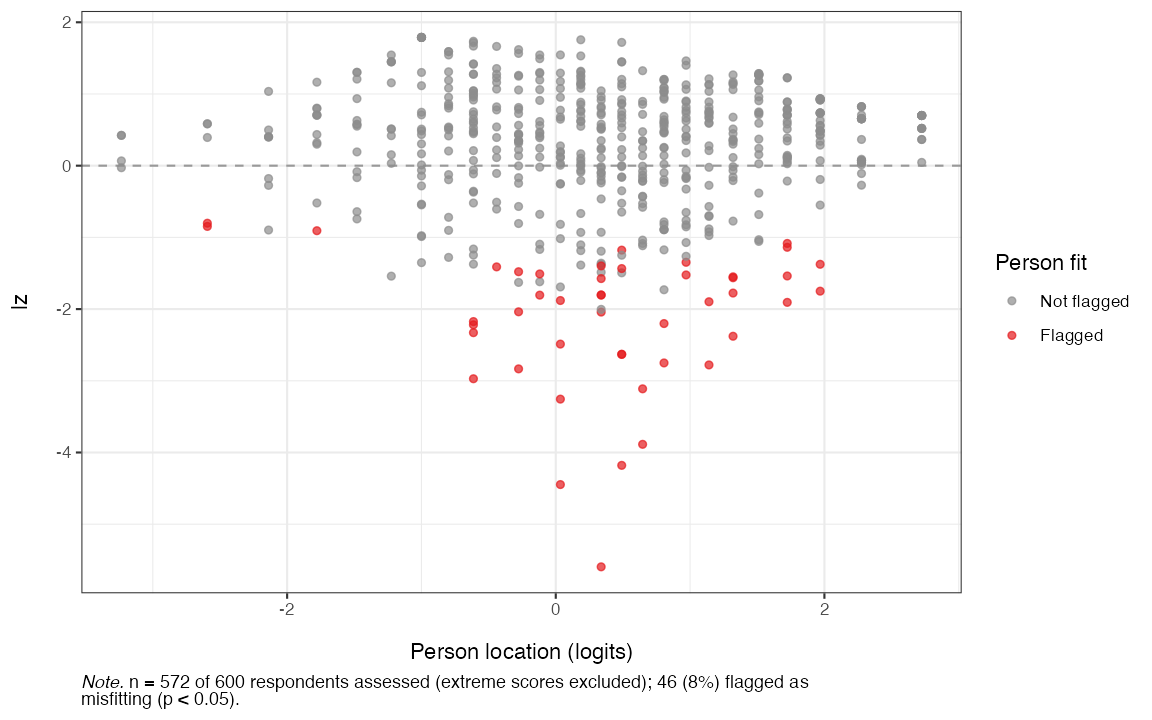
Figure 14. Person fit with the lz statistic
Where to next
- Each
RM*()function is documented with its own?functionreference page including a worked example. - The simulation-based cutoffs used above (
RM*Cutoff()) can be parallelised on multiple CPU cores via themiraipackage; see the relevant help pages.- For a progress bar on time-consuming simulations, add
verbose = TRUEto the function call. This should not be used when rendering Quarto/Rmd files.
- For a progress bar on time-consuming simulations, add